Wiring and Configuration
Buffer Internal Wiring Diagram
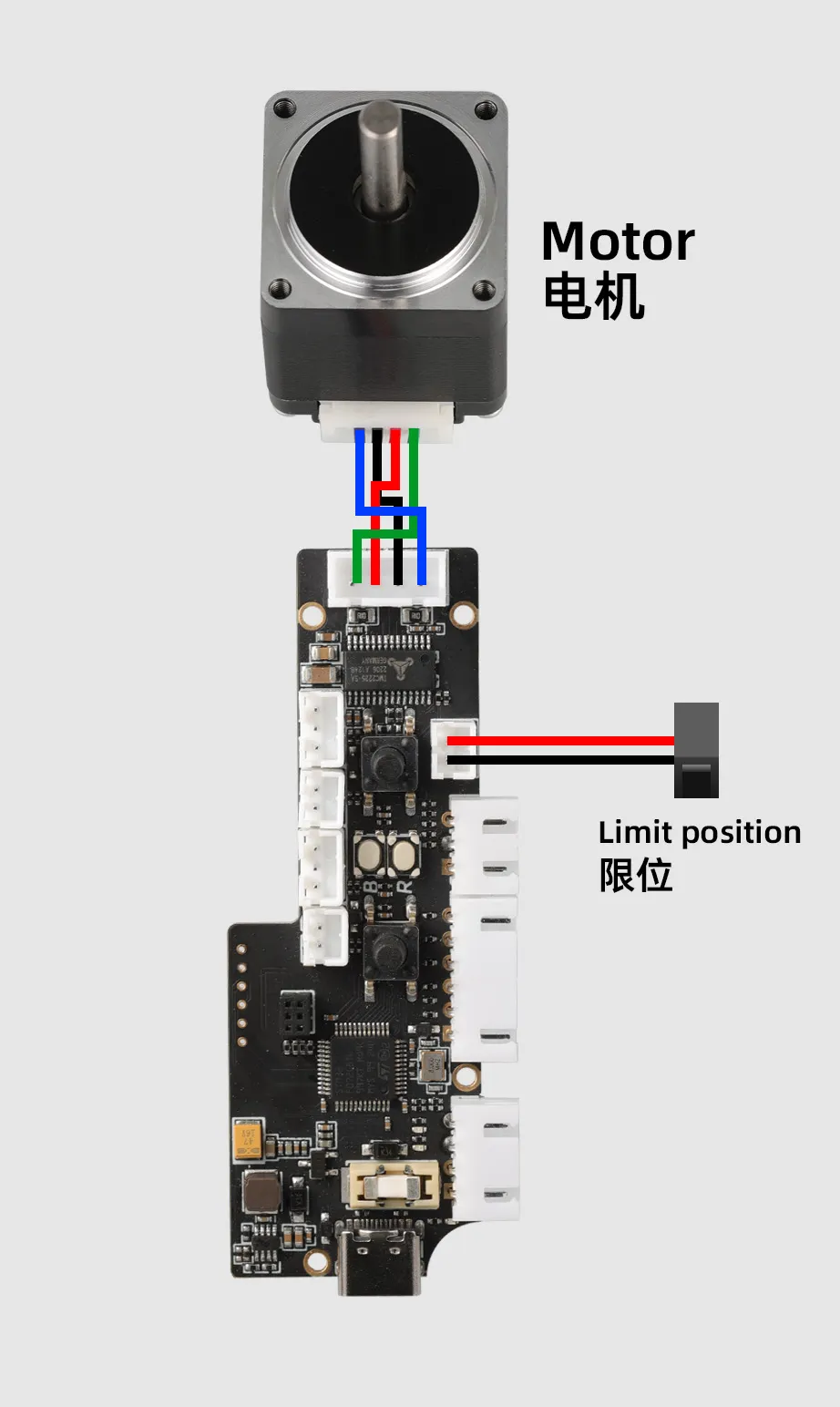
Installation Video
How to Connect the Buffer to the Mainboard and Configuration Methods
- The
MMU Toolboardshown in the wiring example below is only for reference regarding the interface definition. When actually using it, you need to:
- Directly connect the cables to the endstop signal ports of your KLIPPER mainboard.
- In the configuration file (e.g.,
printer.cfg), modify and confirm the corresponding port number configuration, to ensure the functionality works properly.
- Basic Functions
- Using Trigger for Buffer Feeding or Retraction Function
- Wiring and Configuration Using the MDM Sensor
-
This buffer integrates the functions of filament runout detection and manual control:
-
Filament Runout Detection (FILAMENT_SENSOR)
- Signal Output: After filament runout is triggered, the
PB15pin of the buffer outputs a low-level signal.
- Signal Output: After filament runout is triggered, the
-
Feed Button (FEED)
- Single Press: The
PA2pin of the buffer outputs a high-level pulse signal for 3 seconds. - Long Press: The buffer will perform a continuous feeding action until the button is released.
- Single Press: The
-
Retract Button (RETRACT)
- Single Press: The
PA3pin of the buffer outputs a low-level pulse signal for 3 seconds. - Long Press: The buffer will perform a continuous retraction action until the button is released.
- Single Press: The
Wiring Guide
-
When using the above functions, please refer to the wiring diagram below:
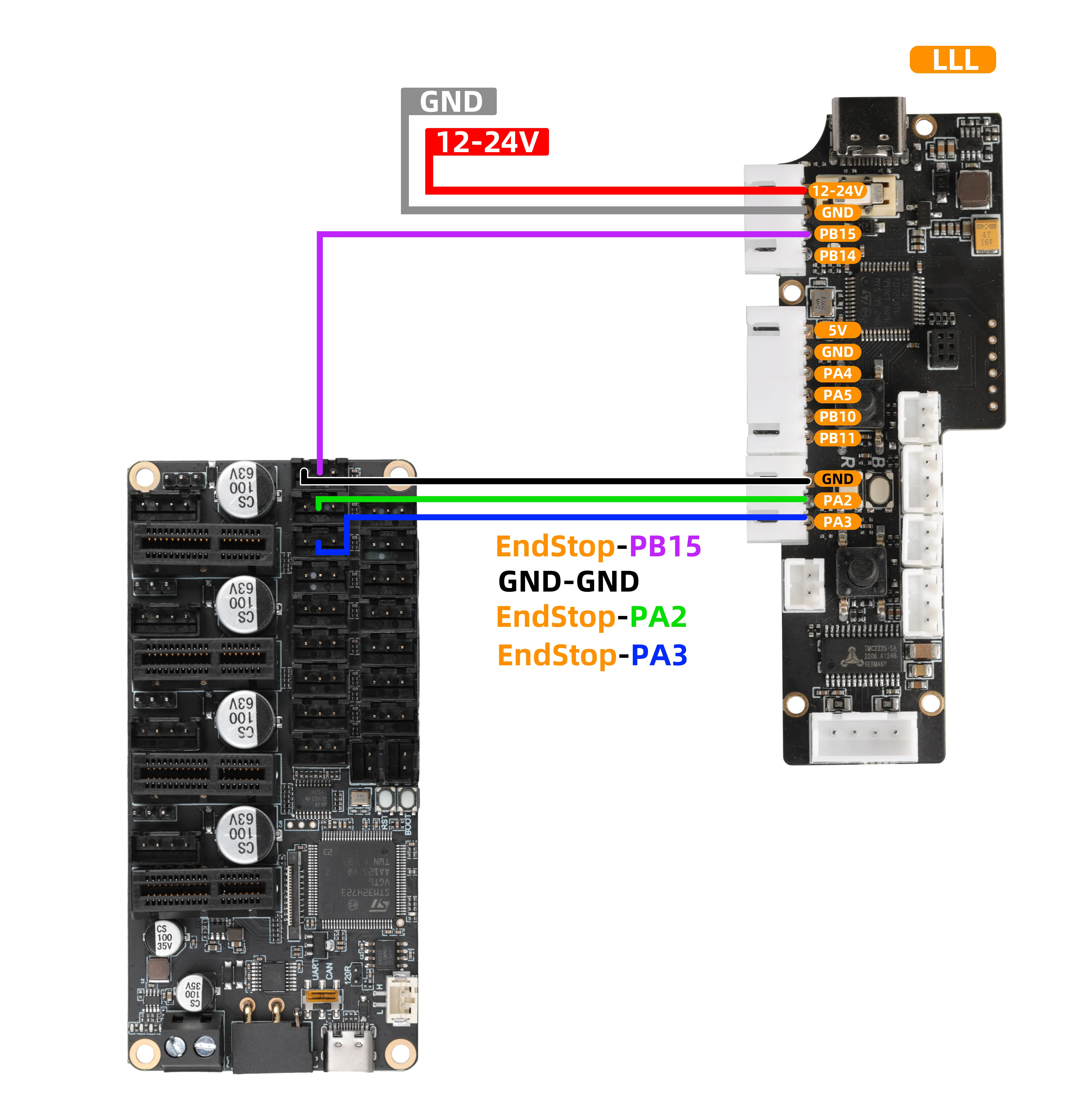
- The
MMU Toolboardshown in the diagram is only for reference regarding the interface definition. When actually using it, you need to:
- Directly connect the cables to the endstop signal ports of your KLIPPER mainboard.
- In the configuration file (e.g.,
printer.cfg), modify and confirm the corresponding port numbers forPD3,PD4, andPD5, to ensure the functionality works properly.
Configuration Reference
- Reference Configuration Using the Mainboard
[filament_switch_sensor Material_breakage_detection]
pause_on_runout: true
switch_pin: ^PD3 # Replace with the pin you are using
runout_gcode:
    PAUSE
    RESPOND MSG="Filament runout triggered"
    #SET_IDLE_TIMEOUT TIMEOUT=86400
insert_gcode:
    RESPOND MSG="Triggered feeding"
event_delay: 2.0
pause_delay: 2.0
debounce_delay:2.0

[gcode_button Trigger Feeding]
pin:^!PD4 # Replace with the pin you are using, connected to the feed pin
press_gcode:
    RESPOND MSG="Triggered feeding"
    # Custom Gcode

[gcode_button Trigger Retraction]
pin:^!PD5 # Replace with the pin you are using, connected to the retraction pin
press_gcode:
    RESPOND MSG="Triggered retraction"
    # Custom Gcode
-
The firmware needs to be updated to
V1.1.0 -
The buffer can perform automatic continuous feeding by detecting the following pin level status:
-
Automatic Feeding: When the pin
PB5detects a low-level signal, the buffer will perform continuous feeding. -
Automatic Retraction: When the pin
PB6detects a low-level signal, the buffer will perform continuous retraction.
Wiring Guide
- When using the above functions, please refer to the wiring diagram below:
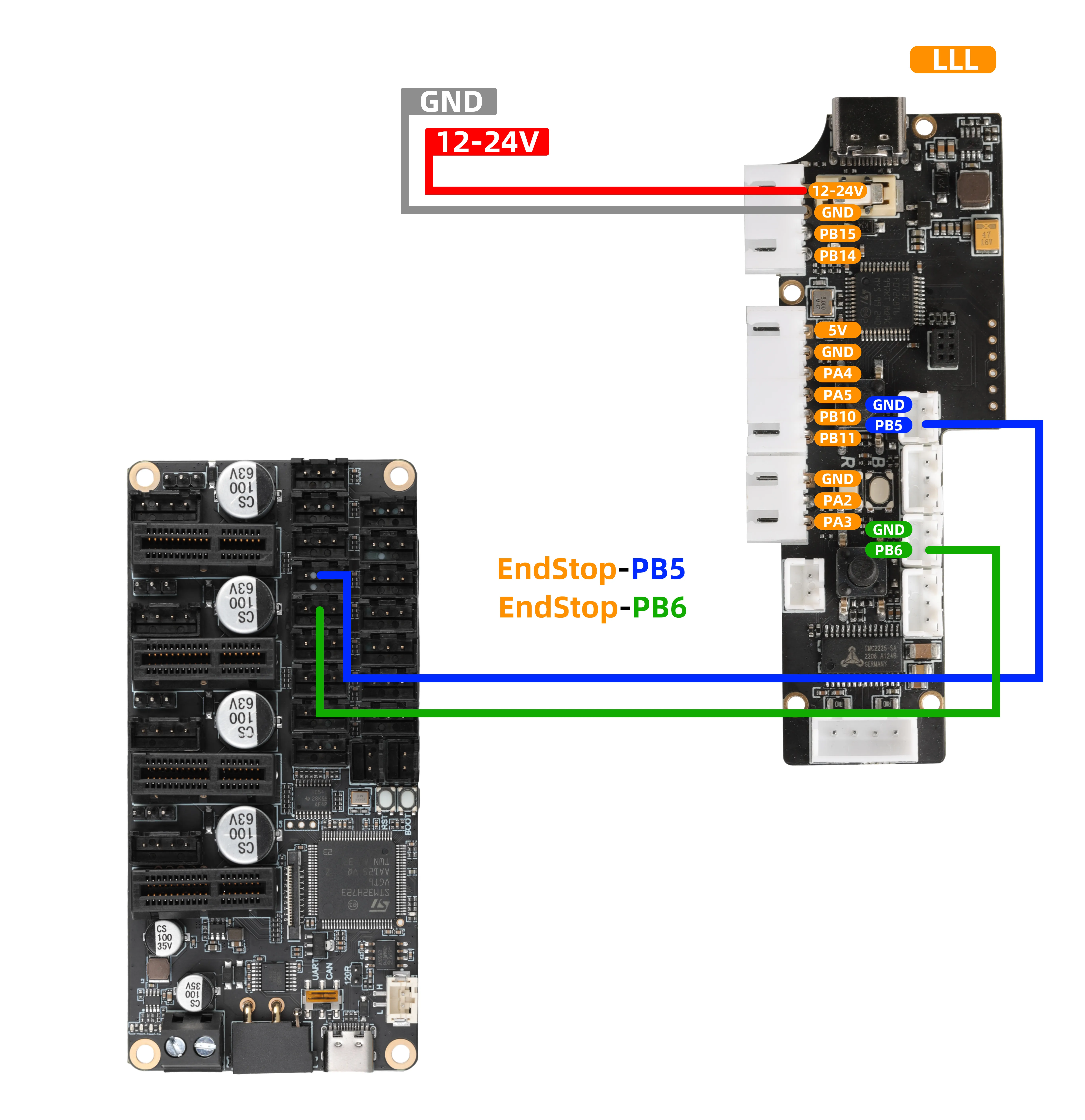
- The
MMU Toolboardshown in the diagram is only for reference regarding the interface definition. When actually using it, you need to:
- Directly connect the cables to the endstop signal ports of your KLIPPER mainboard.
- In the configuration file (e.g.,
printer.cfg), modify and confirm the corresponding port numbers forPB5andPB6, to ensure the functionality works properly.
Reference Configuration
- Add the configuration
- Please note that this configuration must be added after the basic functions are configured
- Reference Configuration Using the Mainboard
[output_pin _Feed Button]
pin:!PD6 # Replace with the pin you are using
debounce_delay:2.0
value:0

[output_pin _Retract Button]
pin:!PD7 # Replace with the pin you are using
debounce_delay:2.0
value:0

[gcode_macro Buffer Feeding]  ## Buffer Feeding
gcode:
    SET_PIN PIN=_Retract_Button VALUE=0
    SET_PIN PIN=_Feed_Button VALUE=1
    G4 P10000 # 10 seconds
    SET_PIN PIN=_Feed_Button VALUE=0

[gcode_macro Buffer Retraction]  ## Buffer Feeding
gcode:
    SET_PIN PIN=_Feed_Button VALUE=0
    SET_PIN PIN=_Retract_Button VALUE=1
    G4 P10000 # 10 seconds
    SET_PIN PIN=_Retract_Button VALUE=0
Function Overview
- When used with the
FLY-MDMfilament runout/clog sensor, the buffer can achieve clog detection functionality. - The firmware needs to be updated to
V1.1.0.
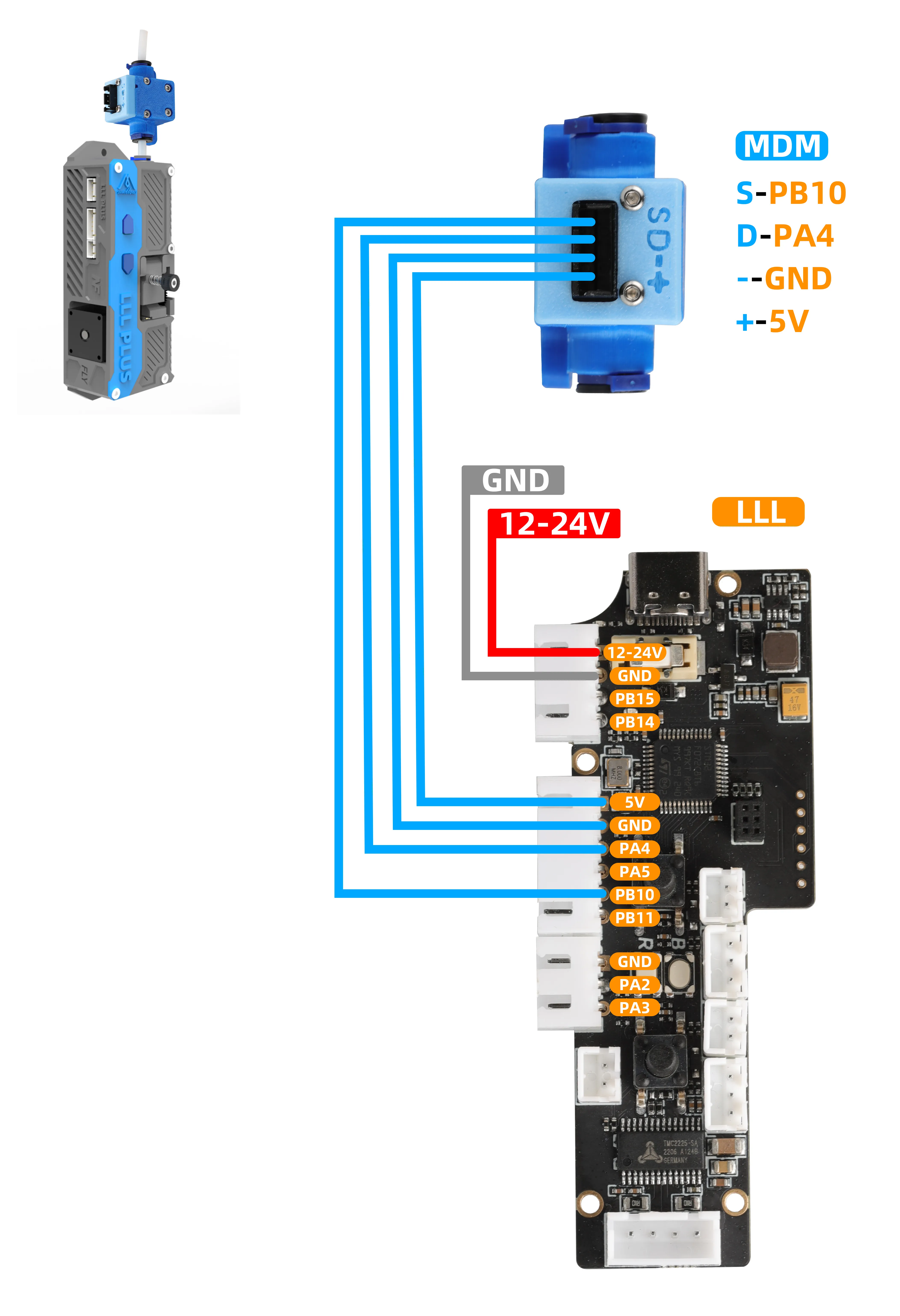
Hardware Wiring
- The signal cable of the buffer should be connected to any unused general-purpose digital output pin on the mainboard, for example:
- Connect the
STEPfrom the buffer'sPA5to any of the mainboard'sPWM,RGB, or12864pins. Please note that the servo port of the BL-Touch can also be used. - Connect the
DIRfrom the buffer'sPB11to an endstop port on the mainboard.
-
This connection is used to monitor the working status of the extruder motor and is key to achieving clog detection.
-
When using the above function, please refer to the wiring diagram below:
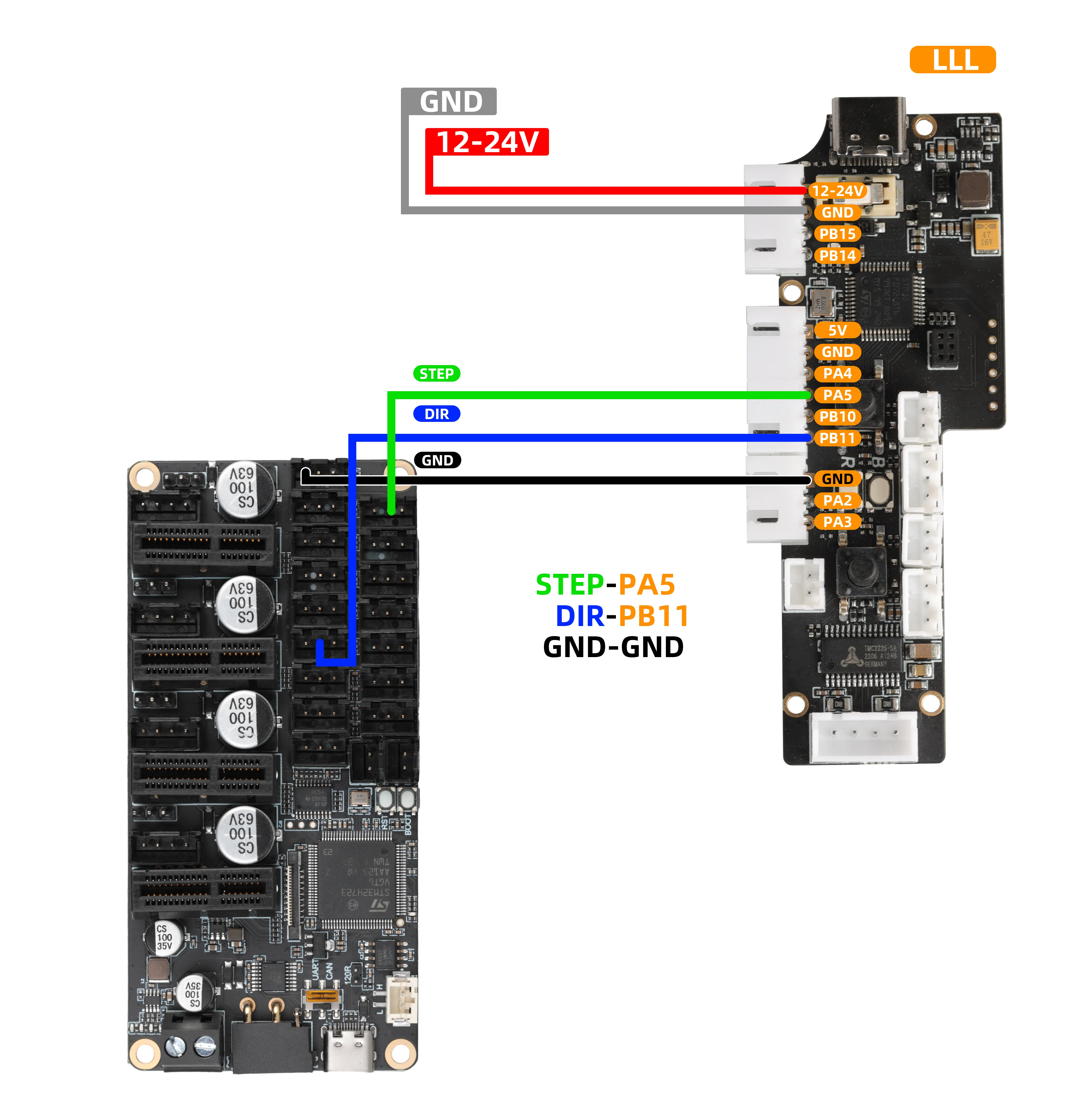
- The
MMU Toolboardshown in the diagram is only for reference regarding the interface definition. When actually using it, you need to:
- Directly connect the cables to the endstop signal ports of your KLIPPER mainboard.
- In the configuration file (e.g.,
printer.cfg), modify and confirm the corresponding port numbers forPD3andPC0, to ensure the functionality works properly.
- MDM Reference Wiring
Reference Configuration
- Add the configuration
- Please note that this configuration must be added after the basic functions are configured.
- Please note that in the configuration below, you must modify the
STEPandDIRpins to match the ones you have wired. - Also, other configurations must match your extruder settings, otherwise clog detection will fail.
- Reference Configuration Using the Mainboard
[extruder_stepper my_extra_stepper]
extruder = extruder
step_pin: PE10
dir_pin: PD4
rotation_distance: 17.472
gear_ratio:50:10
microsteps:16
full_steps_per_rotation: 200
Buffer Parameter Configuration
Get via Serial Tool Assistant- Connect the module to the computer using a
USBcable, open the serial tool assistant, select the corresponding COM port, set the baud rate to 115200, and click Connect.
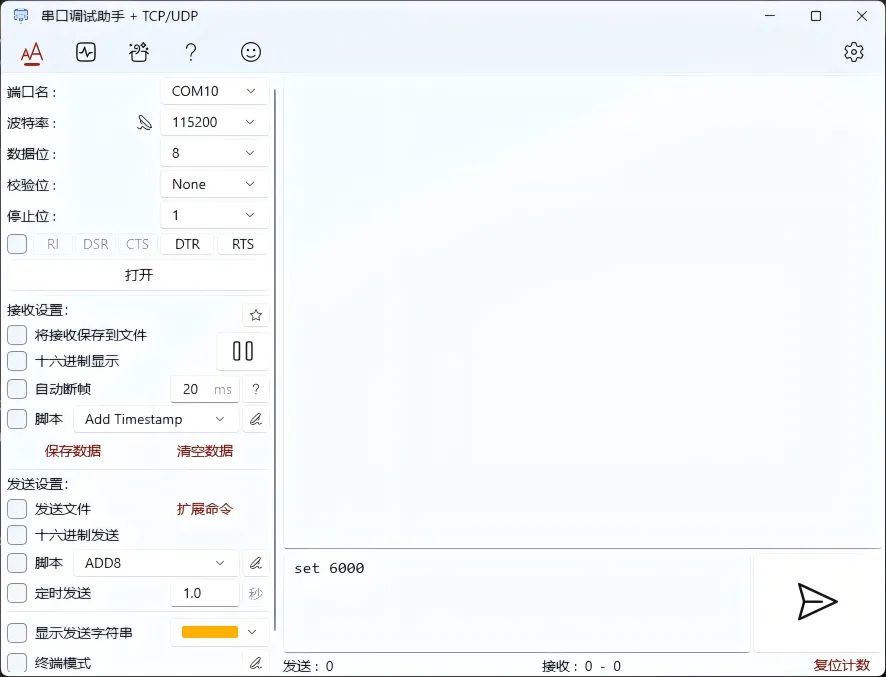
- If your extruder configuration does not include
gear_ratio, set bothDriver Gear TeethandDriven Gear Teethto1.
Parameter Description
| Function Description | Configuration Command (Please enter in the serial tool) | Default Value | Unit | Notes |
|---|---|---|---|---|
| View all current parameters | Loading... | - | - | Send command to read all current configurations. |
| Set motor pulse count | Loading... | 916 | - | Set the number of pulses required for the motor to move per millimeter. |
| Set encoder detection distance | Loading... | 1.73 | mm | Set the filament movement distance represented by each encoder signal. |
| Set run timeout duration | Loading... | 60000 | ms | Set the auto-stop time in an untriggered state to prevent continuous extrusion. |
| Set error scaling factor | Loading... | 2.0 | - | Allowed error = encoder value X scale value.Example: 1.73 * 2.0 = 3.46 mm |
| Set speed control command | Loading... | 260 | mm | Set the buffer operating speed, maximum 600 (revolutions/minute), firmware needs to be updated to V1.1.1 |
Operation Notes:
- Command Format: In the "Configuration Command" column of the above table, a full line of command (e.g.,
steps 916) is the content that needs to be fully entered. - Sending Method: Enter the command in the sending area of the serial assistant, then click Send.
- Auto Save: Once the command is sent successfully, the parameter will take effect immediately and be automatically saved, no additional save operation is required.
- Confirm Configuration: After modifying any parameter, send the
infocommand to query all current parameters to verify whether the configuration is correct.